
Hot Yoga Copenhagen | VR tour
ABOUT
This is a freelance project that I have done for a local yoga studio – a virtual tour of the Hot Yoga Copenhagen central studio location that was shot using Samsung Gear 360 camera and put together in Cupix cloud based software.
MOTIVATION
My motivation for this project was coming purely for my geeky love for tech in general. I was just happy to get another opportunity to get my hands on 360 shooting. And challenge myself how fast I can learn to work with an unfamiliar software 🙂
DEVELOPMENT
- Since I never had previous experience with virtual tour development, I had to research the best software and 360 cameras out there to work with.
- I decided to proceed with Cupix which is pretty nifty tool, I figured. As a matter of fact, it allows up till 250 MB of space to work for free, which was perfect in my case.
- In Cupix every photo is called “pano” and has to be shot very specifically for software to be able to process it – each photo should be taken aligned in approx each 1-3 meters, in doorways each 0,5 meters.
- I have booked Samsung Camera 360 (which was the only 360 camera I could get my hands on to work with (I am very much aware of the consumer level quality of this camera)) and a microphone stand (ideal stand for 360 cameras would have a much shorter legs, not to be seen in the shot).
- Before shooting in the studio I had to prepare the environment, make it look representable, adjust the lightning for the better picture quality without loosing the atmospheric feeling, and set up the right heights for the stand, which I chose to be the 165m eye level.
- I have shot the yoga studio several times to get as many photographs as possible to work with.
- All the obtained files were processed in Gear 360 Action Director to convert fisheye view files to equirectangular view files.
- After all equirectangular view files were color corrected in Adobe Photoshop.
- Processed files were uploaded to the Cupix software.
- Files were divided into sections (rooms), and panos were manually aligned and connected with each other to match the true layout of the studio.
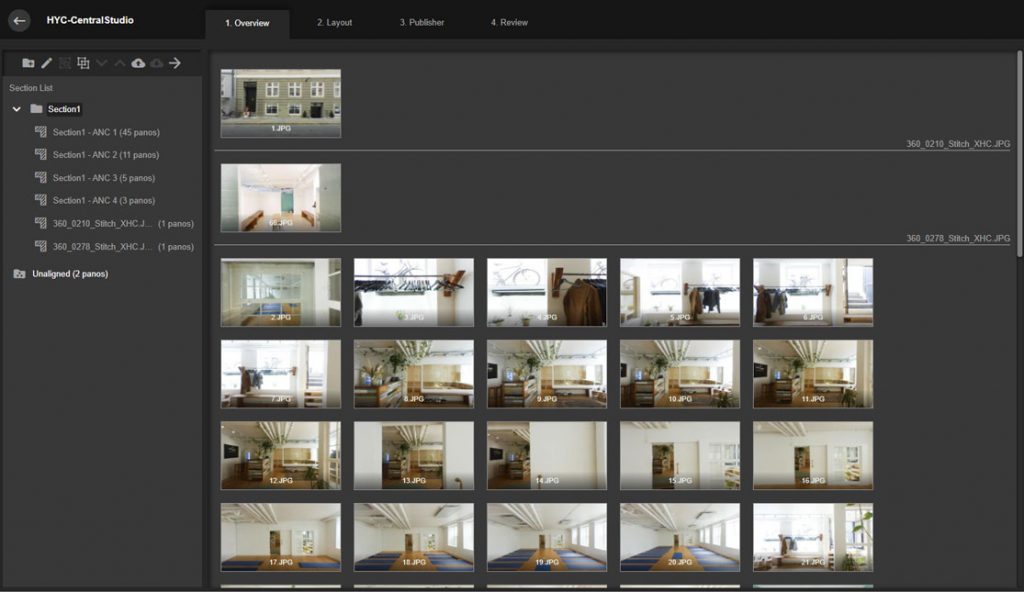 This picture shows Cupix Overview page where all of the files can be found structured into sections
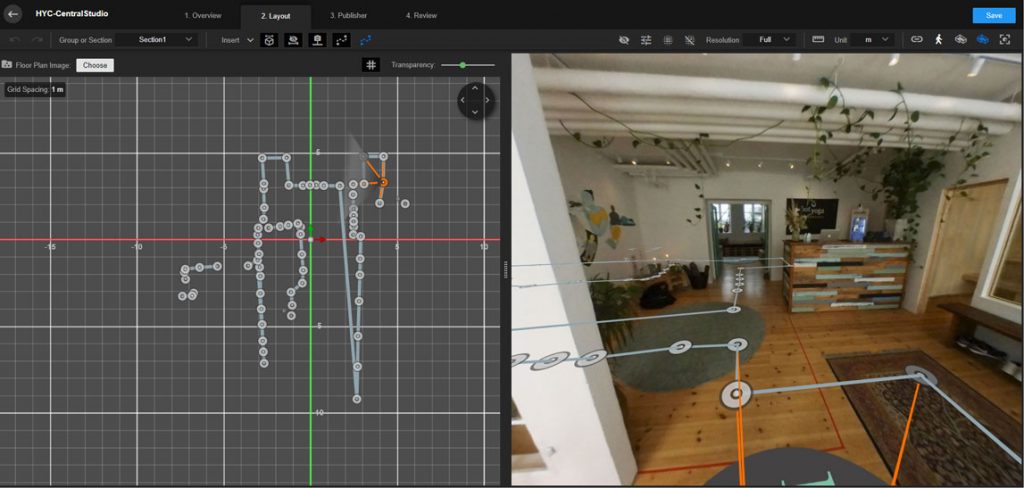 This picture shows Cupix Layout of the “panos”